
- What content is needed?
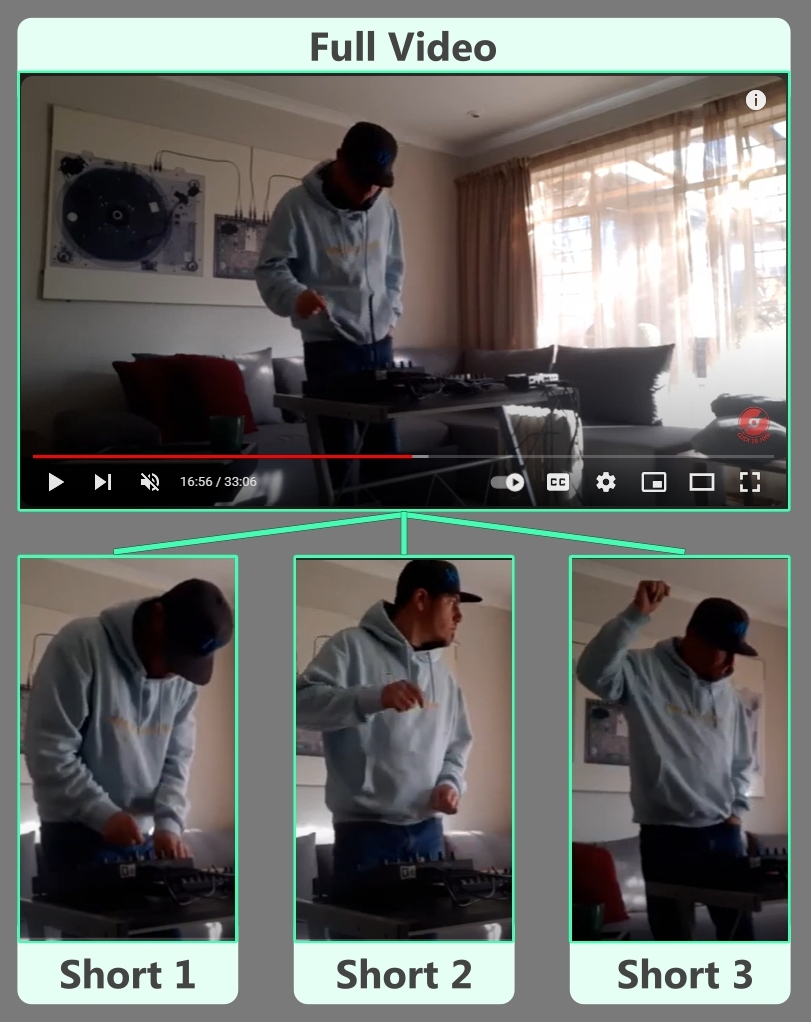
Apart from the full-length video, I also suggest that you cut 2 or 3 Short/TikTok style video from the main video to be used as YouTube Shorts as well as on other platforms like TikTok & Instagram Stories. These should be cut in portrait orientation and not exceed 1 min in duration.
In addition to these, you should also record a quick clip, just like the short content above, of your self-announcing that the video is coming or available. (Or Both)
All this short content will be used in accordance with your video upload date.
- When to upload and go live?
To find out the best time for your full video to go live, you should login to your YouTube Studio and look at your analytics. From a PC, go to ‘Analytics’ in the menu on the left-hand side, then click ‘Audience’ on the top menu. In that view you will see a section that says “When your viewers are on YouTube” in that graph, you will see when your viewers are mostly on YouTube.
For new channels that do not have enough info to display this section, Saturday afternoons and Sunday mid-day are good times to go live.
When you upload a video to YouTube and you set a premier, a notification is sent out to your subscribers letting them know that you have a new video coming.
You have 2 options to consider, use the one that suites your release strategy best.
OPTION 1: Upload and set the premier in the morning of the day that you want the premier to go live, this way people will get the notification and be able to go to the video and set a reminder for later that day.
OPTION 2: Alternatively, you could upload before the go live date, this will allow you to share the premier link when you share your short videos and promote on other platforms.
- HOW TO UPLOAD?
When uploading it is essential to upload in a way that works with the YouTube algorithms so that your video is easy to find and get suggested alongside other relevant content to promote discovery and organic growth.
The following is essential:
- The title should display the main artist’s name, the title of the song, any featured artists and the video version such as Official Music Video, Live Performance, Lyric Video, etc
- In the 1st 200 characters of your description, make sure you use the keyworks that are in the title, these are the artist’s name, the title of the song, any featured artists, and the video version, you should also consider adding the genre into that wording. If you can use these keywords more than once, then that is even better. Note that this description must be in a natural sentence, as if you were telling someone this description.
YouTube looks at the title and the description for common words, this gives the algorithm the go ahead to serve this content to people who are searching for it.
- Make sure you add hashtags at the bottom of the description, hashtags to include are general ones, not unique ones. These can include the genre/s (#HipHop #HipHopMusic) or the video version. (#officialvideo #Lyricvideo). You will only need 2 or 3 of these.
- Add other tags in the ‘Tags’ section. When uploading, if you scroll down, there is a button that says, ‘Show More’ and when that opens you will find a section that says ‘Tags’. In here you should include misspelling like Dj Speedster, or other things that people will search to find your video, like ‘Latest Hip Hop songs’ or ‘South African hip Hop Music’. Try to fill this up with as many as you can.
- Add a custom Thumbnail to your video and DON’T use the pre-selected ones that YouTube offer.
You can do this by finding a good part of your video that looks interesting and screen shot the video at that section. On that screen shot, add wording like your artist name, song title and artist features. You could add the Genre in there as well if it fits. This will make your video recognizable and easy to spot, a good thumbnail can change the video uptake tremendously.
- Add in end screens and info cards, these will help keep people on your channel and watching your content.
- END SCREENS: Try adding 1 Video and 1 Subscribe for the last 10 seconds of the video. I normally choose ‘Best for Viewer’ but if you have a related video, then add that.
- INFO CARDS: In the first 30 seconds of the video, add a channel Info card, add your own channel that pushes people to subscribe to the channel. Feel free to also add any addition cards through the video that are relevant to that content.
- How to share / roll out the video and content?
You should now have your full video, 2/3 short clips cut from the video and 2 short clips of you announcing the video is coming and that it is out now. When posting these, consider adding 2 or 3 days between each, here are suggested dates to give you an idea of the roll out.
- Upload full video and set premier for the below date. (Copy and save link to premier)
- Short Teaser 1: 25 June 2023 | Upload short to YouTube, TikTok & Instagram, include full video link where possible and tell people to set the reminder.
- Coming Soon Clip: 28 June 2023 | Upload short to YouTube, TikTok & Instagram, include full video link where possible and tell people to set the reminder.
- Full Video Goes Live: 1 July 2023 | Remember to share and remind people that the video is going live today, try being online for the premier and reply to comments.
- Short Teaser 2: 4 July 2023 | Upload short to YouTube, TikTok & Instagram, include full video link where possible and tell people to subscribe.
- Out Now Clip: 6 July 2023 | Upload short to YouTube, TikTok & Instagram, include full video link where possible and tell people to subscribe.
- Short Teaser 3: 8 July 2023 | Upload short to YouTube, TikTok & Instagram, include full video link where possible and tell people to subscribe.
- Do Paid Promotion
- Put some budget towards boosted posts on Facebook and Instagram so that you reach a wider audience, do this only after the video is live, boost the short videos that link back to the full video on YouTube.
- Put some spend on promoting the full video with Discovery ads on Google/YouTube so that you reach a wider and more targeted audience.
- Push some marketing spend on boosted TikTok posts, these are called Spark ads, this will also help you to reach a wider audience than your current network.
- Other Content Types
- It is understandable that we do not release new music every week or as regularly as needed to maintain a consistent stream of new content going live on your channel which maintains channel growth.
- For this we suggest that you look at uploading other forms of content around the same song and applying this strategy for each content piece.
- Other forms of content can include the release of a lyric video, then the official video and then a live performance video which are all based around one song. Given that this is a 2-week plan, that will give you 6 weeks of content per song.
- For other songs which are not a focus for an Album or EP, consider uploading visualizer content so that people can still access those songs on your channel.



 FIND MUSIC
Leave a comment